The game needs Windows 10 or 11. It plays over a local network only, so everyone has to be on the same Wi-Fi or wired network. One PC is enough to play: QUICK MATCH starts a game against bots.
Tanks Mate 2: Toon Tanks
How to play
Tanks Mate 2: Toon Tanks is a tank battle for one to four people on the same home network, with bots to fill the other seats. This page shows how to get it running, what everything on the main menu and in the lobby does, and how to drive and shoot.
Download for Windows Version 0.2.30, a 105 MB zip. Free to download and play.
Get it running
- Download the zip and unzip it anywhere. Keep the folder together.
- Open the TanksMateToon folder and run TanksMateToon.exe.
- Windows may say Windows protected your PC, because the game is not code-signed. Choose More info, then Run anyway.
- On the PC that will host, Windows Firewall asks about the game the first time it runs. Click Allow. The box can open behind the game, so press Alt + Tab to find it. If that PC's network is set to Public, tick Public networks as well.
- Put the same version on every PC that will play together. The version is at the bottom right of the main menu.
The main menu
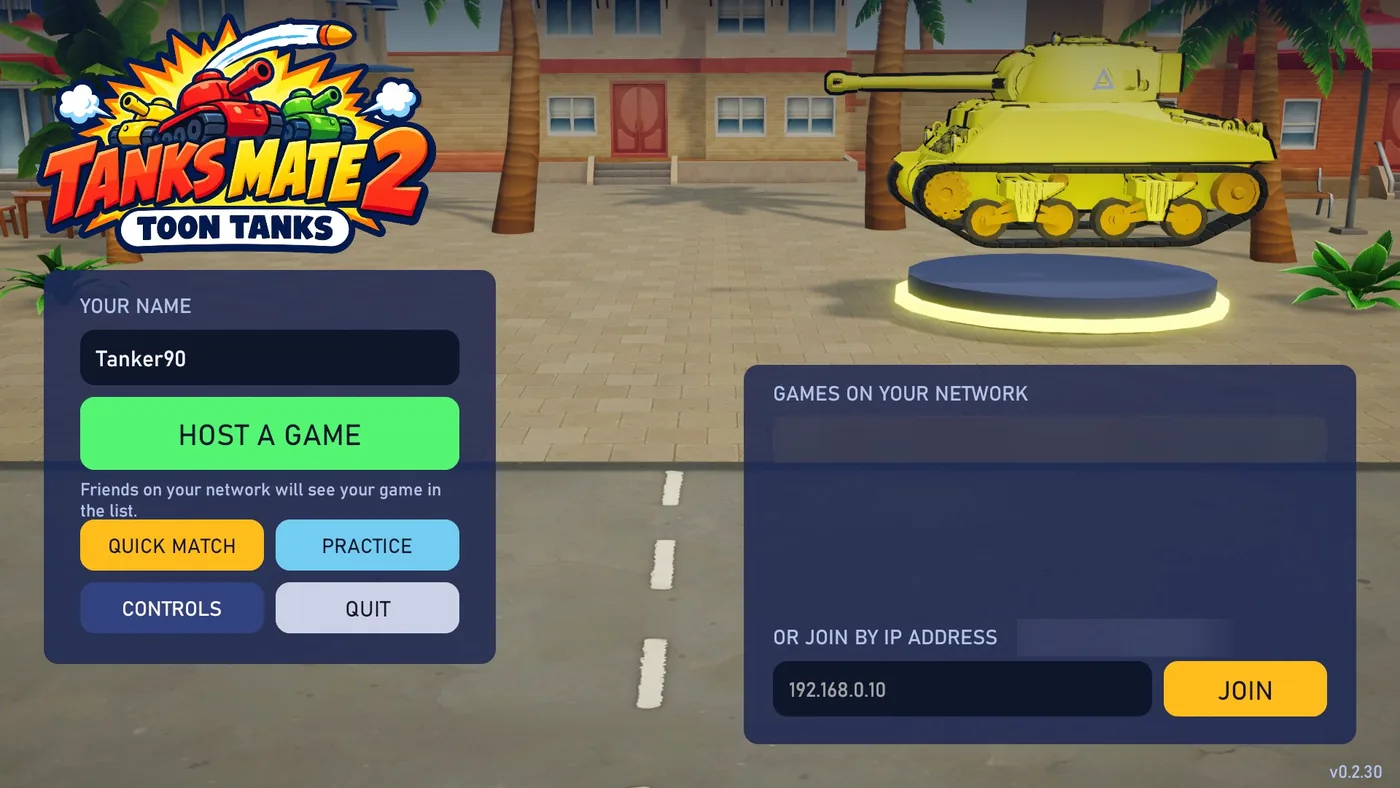
The main menu is where you name yourself and either start a game or join one. The tank on the pedestal is only for show. You pick yours in the lobby.
The lobby
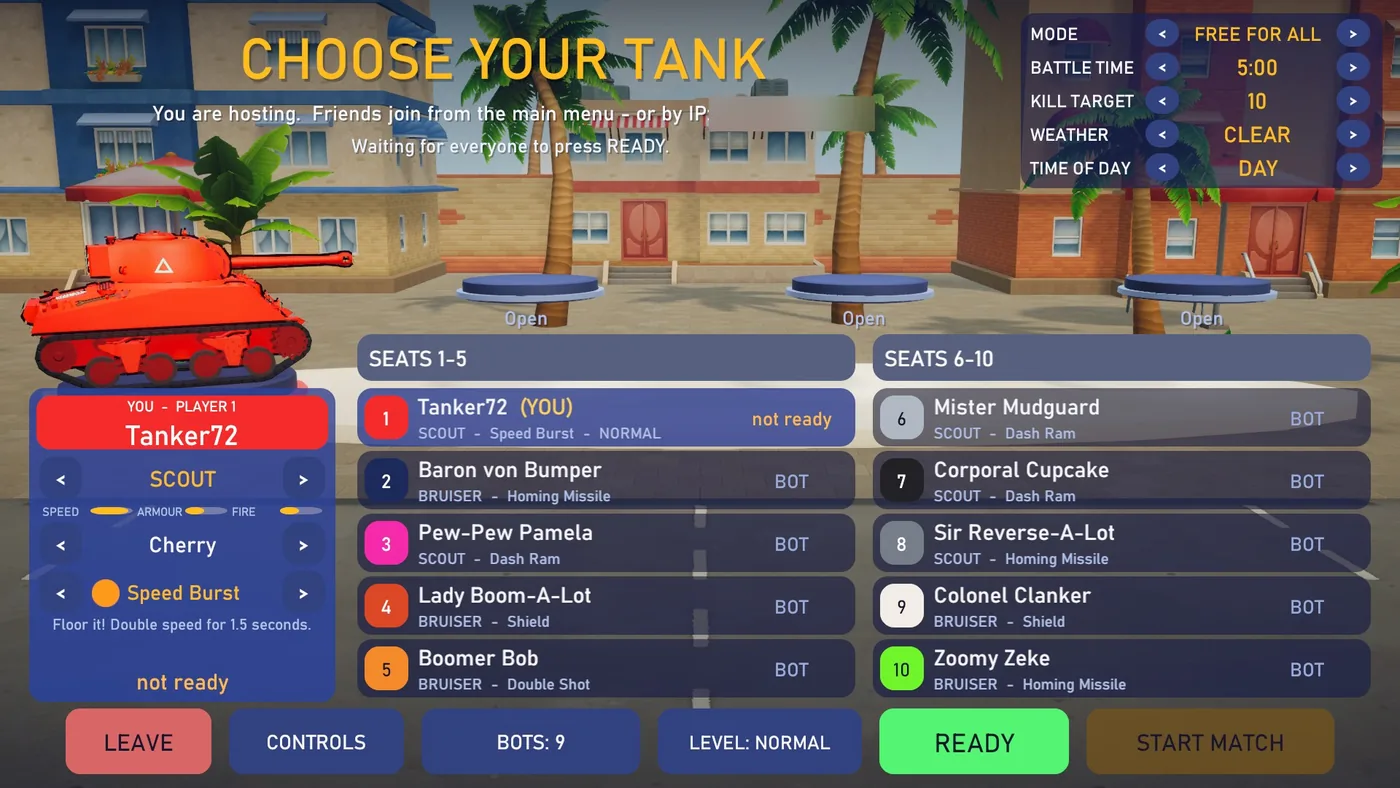
Hosting or joining a game takes you to the lobby. Everyone picks a tank here, and the host sets up the match. The first picture is what the host sees in a free for all. A player who joined sees the same screen without the host's buttons.
- 1
Tank
SCOUT or BRUISER. The Scout is quicker and reloads sooner. The Bruiser is slower, and each of its shells does more damage. The bars underneath compare them.
- 2
Skin
26 paint jobs, from Cherry to Penguin. Two people cannot wear the same one.
- 3
Ability
One of six, with a line underneath saying what it does. They are listed under In a match below.
- 4
Match options
Only the host can change these. MODE is FREE FOR ALL or TEAMS. BATTLE TIME is 5, 10, 15 or 20 minutes. KILL TARGET is 5, 10, 15 or 25 kills. WEATHER is CLEAR, RAIN, FOG, SNOW or RANDOM, and TIME OF DAY is DAY, DUSK, NIGHT or RANDOM.
- 5
The host's address
What a friend types under OR JOIN BY IP ADDRESS if the game is not in their list. A player who joined sees Connected to the host here.
- 6
The seats
Ten seats, for up to four people and the bots. A row shows the name, the tank and the ability. A person's row also shows their bot level and whether they are ready. The other people's tanks stand on the three pedestals above.
- 7
LEAVE
Back to the main menu. If the host leaves, the game ends for everyone.
- 8
CONTROLS
The same list of controls and options as on the main menu.
- 9
BOTS
Host only. Each click takes one bot away, from nine down to none, and then starts again at nine.
- 10
LEVEL
How good the bots are against you, from VERY EASY through EASY, NORMAL and HARD to VERY HARD. Everyone picks their own, and a bot plays at the level of whoever it is fighting.
- 11
READY
Press it when you have chosen. Press it again to go back to choosing.
- 12
START MATCH
Host only. It lights up once every person is ready.
- 1
TEAMS
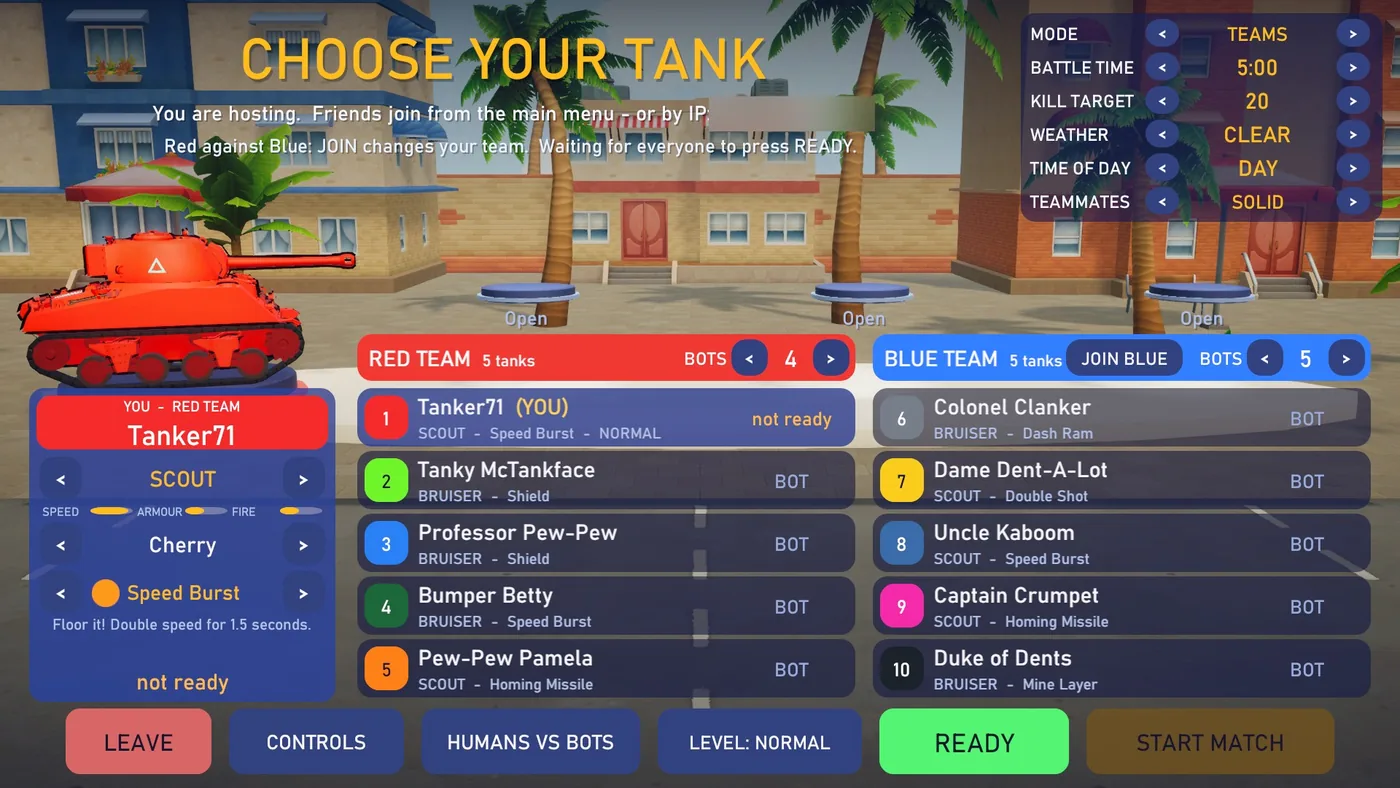
Red against Blue, five seats a side. Your shots, mines and rams do not hurt your own team. The kill target counts the whole team's kills, and is 10, 20, 30 or 50.
- 2
TEAMMATES
SOLID or PASS THROUGH. With pass through, tanks on the same team drive through each other.
- 3
BOTS on each team
Host only. The arrows set how many bots each team gets, from none to five.
- 4
JOIN BLUE or JOIN RED
Moves you to the other team.
- 5
HUMANS VS BOTS
Host only. Puts every person on Red and fills Blue with bots, one more than there are people.
On a gamepad in the lobby, X changes the tank, LB and RB the skin, LT and RT the ability, A presses the highlighted button and Y opens the controls.
Controls
The game takes a keyboard and mouse or a gamepad, and switches to whichever you touched last. Holding F1, or Back on a gamepad, shows this list during a match.
| Keyboard and mouse | Gamepad | |
|---|---|---|
| Drive and steer | W A S D or the arrow keys | Left stick |
| Turn the turret and the camera | Mouse | Right stick |
| Fire (hold to keep firing) | Left mouse button | Right trigger |
| Zoom in and out | Mouse wheel | Hold the left trigger |
| Sniper view on and off | Middle mouse button | Click the left stick |
| Switch camera view | Right mouse button | Click the right stick |
| Look around (hold) | Left Ctrl | RB |
| Special ability | Space | LB |
| Headlights at dusk and night | F | Y |
| Emotes (hold, point at one, let go) | V | D-pad down and the right stick |
| Pause menu | Esc | Start |
| Full screen or window | F11 |
The CONTROLS button also holds the options. Aim assist is OFF, NORMAL or EASY, and nudges your aim toward a tank near the crosshair. With Lock-on switched on, the right mouse button or a click of the right stick locks the turret onto a tank. Mouse up / down is INVERTED or NORMAL, and starts out inverted. Display is FULLSCREEN or WINDOW. Emotes from others is ALL, PEOPLE ONLY or NONE.
In a match
A match starts with a three second countdown. In a free for all the first tank to reach the kill target wins, and in a team match the first team. If the clock runs out first, whoever is ahead wins. A destroyed tank comes back after three seconds and cannot be hurt for the first two. After the results, everyone goes back to the lobby.
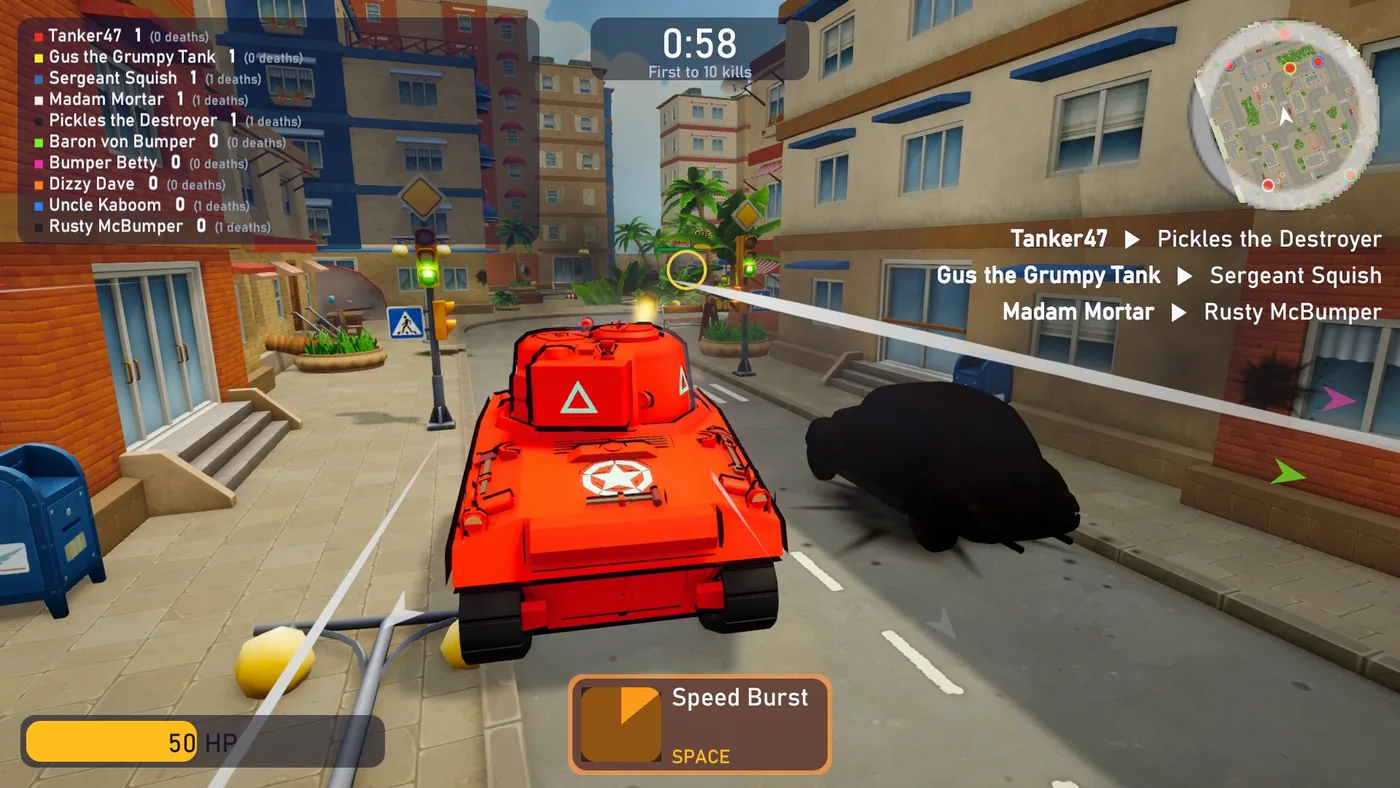
- 1
Scoreboard
Every tank's kills and deaths. It stays on screen for the whole match.
- 2
Clock and target
The time left and the kills needed to win. In rain, fog, snow, dusk or night, the conditions are written underneath.
- 3
Radar
You are the white arrow. Enemies are red dots, teammates green ones, and power-ups show in their own colours. An enemy that has just fired shows at the rim even when it is out of range.
- 4
Kill feed
Who destroyed whom, and the emotes people send.
- 5
Arrows at the edge
Each one points at an enemy that is off screen, and pulses when that enemy fires or hits you.
- 6
Health
Every tank has 100. The bar turns amber at half and red at a quarter.
- 7
Ability
Its name and its key. The square fills up again while the ability recharges.
- 8
Crosshair
The white ring is where you are aiming. The barrel has its own ring, which turns green when the gun has caught up with your aim.
Abilities
- Speed Burst
- Double speed for a second and a half. Ready again after 8 seconds.
- Double Shot
- Charges as you fire. After four shots, press the ability key to fire two extra shells.
- Shield
- Takes one hit for you. It stays up for 8 seconds at most, then needs 25 seconds.
- Mine Layer
- Drops a mine behind you that arms after a second and does 60 damage. Ready again after 10 seconds.
- Homing Missile
- Chases a tank within 45 metres, going round buildings on the way, and does 40 damage. Ready again after 12 seconds.
- Dash Ram
- A short lunge. It does 35 damage to a tank you hit, and nothing can hurt you during it. Ready again after 9 seconds.
Power-ups
- Repair
- Gives back 40 health at once.
- Rapid Fire
- Reloading takes less than half as long for 10 seconds.
- Triple Shot
- Three shells at a time for 10 seconds.
- Bouncing Shells
- Shells bounce off walls twice for 10 seconds.
- Mega Shell
- Two and a half times the damage for 10 seconds.
Weather and night
- Rain, fog and snow
- Cut how far you can see, and how far the radar reaches.
- Snow
- Also makes the streets icy, so tanks are slow to get going and slow to stop.
- Dusk and night
- Darker, with the street lamps lit. F or Y switches your headlights. They light the street ahead, and they let other tanks spot you from twice as far.
Emotes
- Sending one
- Hold V, point the mouse at a face and let go. On a gamepad, hold D-pad down and point with the right stick.
- The eight
- LOL, Hi!, Nice shot!, Taunt, Woohoo!, Noooo, Sorry! and GG.
- The limit
- One every two seconds and three in ten.
Driving over a power-up box picks it up, and a new power-up replaces the one you had. The Dev Log tells how each of these was built.